
Reel Estate Now Has MLS-Compliant Video Creation
Learn how to create listing videos that meet MLS compliance standards
Table of Contents
- What “MLS-Compliant Video Creation” Actually Means
- Why MLS Video Compliance Matters More Than Ever
- Introducing Reel Estate’s MLS-Compliant Video Workflow
- How the Guided MLS Video Creation Works (Step-by-Step)
- Branded vs. Non-Branded Real Estate Videos (And Why It Matters)
- FAQ
- Key Takeaways
- Sources
What “MLS-Compliant Video Creation” Actually Means
“MLS-compliant video creation” refers to producing listing videos that meet the specific rules of your local Multiple Listing Service (MLS). These rules typically focus on accuracy, fairness, and neutrality in listing content.
At a high level, compliance usually includes:
- No agent branding (logos, contact info, watermarks)
- Accurate representation of the property
- Proper formatting (file type, size, resolution)
- Adherence to local MLS rules and disclosures
While the National Association of REALTORS® (NAR) sets overarching policy frameworks, local MLS systems ultimately define their own media rules, meaning requirements vary by region.
For example:
- Realtor.com and many MLS systems require fully unbranded videos
- Zillow allows branding in some cases
- File formats and size limits vary widely
Bottom line: There is no single “universal” MLS standard—compliance is fragmented and easy to get wrong.
Why MLS Video Compliance Matters More Than Ever
Adding video to listings is no longer optional—it’s quickly becoming a competitive advantage. But compliance mistakes can cost you visibility or even lead to listing issues. Many platforms will reject or suppress listings with non-compliant media (especially branded videos).
Maintain Trust and Accuracy
MLS policies emphasize truthful and transparent listing content, especially when using digital enhancements like staging or AI. By separating your listing media into Compliant videos and Promotional videos, you can satisfy all requirements for syndicating your content to MLS, Realtor.com, Zillow, Redfin and more and also create marketing content for social media.
Introducing Reel Estate’s MLS-Compliant Video Workflow
Today, Reel Estate is launching a guided MLS video creation system that removes the guesswork from compliance.
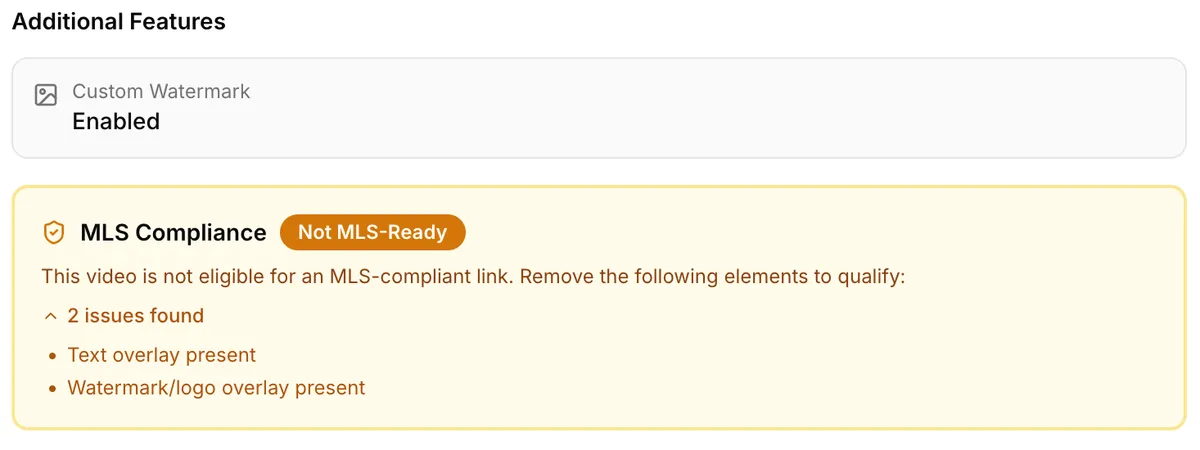
Instead of manually checking rules, editing multiple versions, and hoping your video passes—Reel Estate now helps you generate complaint listing videos by automatically performing a check on your content before the video is created. By scanning for watermarks, logos, text and graphic overlays and audio components, Reel Estate now makes Compliant video creation faster and easier than ever. This is MLS video creation built for real-world agents, not editors.
While a human still has to verify that the AI generated content doesn’t deviate from reality for photo-to-photo staging or photo-to-video clip creation, all the rest of the compliance process is now reviewed and presented to you!
How the Guided MLS Video Creation Works (Step-by-Step)
Here’s how to create a compliant listing video inside Reel Estate:
Step 1: Upload Your Listing Photos
- Drag and drop photos or import from your listing
- Arrange the photos in whatever order makes sense to give the best showcase of the property
Step 2: Customize (Optional)
You can still:
- Stage photos to demonstrate the potential of the space
- Decide on clip length and order
Step 3: Generate your MLS-Compliant Video
Before exporting, you’ll see a clear system prompt to tell you whether your video is compliant and, if not, what you need to change to fix that.
Reel Estate evaluates:
- Presence of logos or branding
- Text overlays or contact info
- Graphics or additional elements on the video
- The presence of audio tracks or effects
- Any video effects like filters
Step 4: Create your Promotional content
Now that you have a Compliant version of the video, simply reopen the project and create your social media marketing content:
- Add your logo, branding information, or descriptions of the property
- Add audio to the video to create a vibe
- Apply a template designed with real estate listings in mind
- Explore dozens of transition effects, image filters, custom stickers and more
- Create vertical videos for Reels or TikTok
The best part is, you with Reel Estate you can create multiple additional Promotional videos in the same Project at no additional cost! Reel Estate charges by AI generation: if you’re happy with the Staging and Video content, reuse it to create as much engaging social media content as you like.
Step 5: Use the custom video URL provided to post to MLS, social media and more
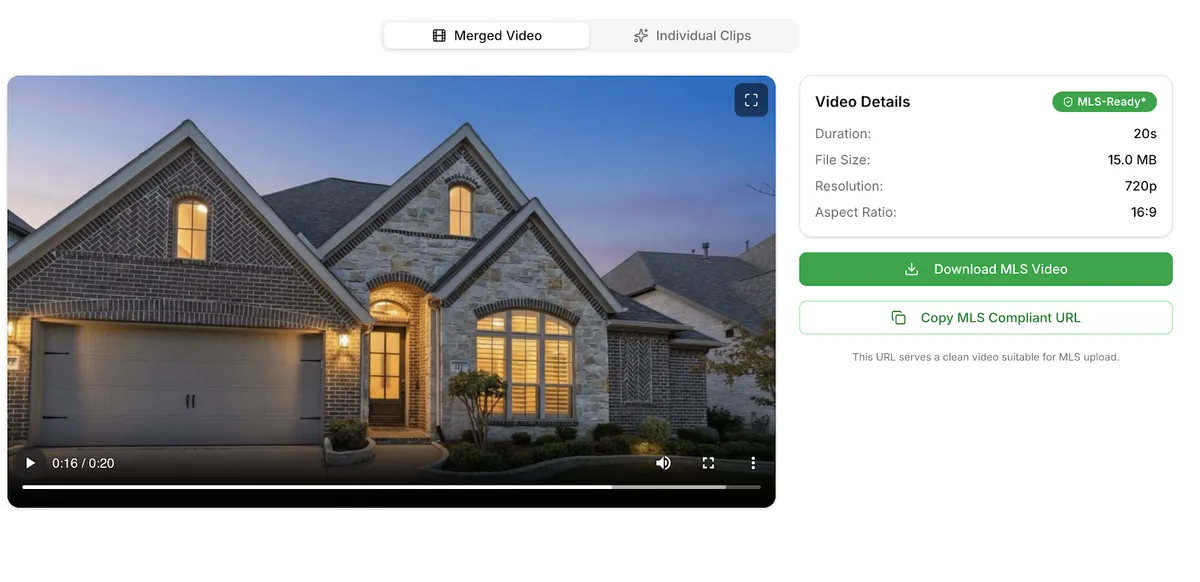
- Use the compliant version for MLS, Realtor.com and other sites
- Use branded versions for social media, ads and more
One workflow, multiple outputs.
Branded vs. Non-Branded Real Estate Videos (And Why It Matters)
One of the biggest sources of confusion in MLS video creation is branding.
Branded Videos
Include:
- Agent name
- Brokerage logo
- Contact info
- Calls-to-action
Best for:
- Social media
- Paid ads
- Personal websites
Non-Branded (MLS-Compliant) Videos
Remove all promotional elements
Required for:
- Most MLS platforms
- Realtor.com
- Redfin
Many platforms explicitly reject videos with visible branding.
Important:
Local MLS requirements can vary. Always check your local MLS rules before publishing.
Reel Estate helps you stay compliant—but your MLS governs final requirements.
FAQ
1. What makes a video MLS compliant?
Typically, MLS-compliant videos must be unbranded, accurate, and follow local technical specs. Requirements vary by MLS, so always verify locally.
2. Can I include my logo in listing videos?
Yes for social media, but usually no for MLS uploads. Many platforms require unbranded content, though branding is allowed on social media and some portals like Zillow.
3. What happens if my video isn’t compliant?
Your listing media may be rejected, removed, or suppressed—reducing visibility and potentially delaying your listing.
4. Does Reel Estate guarantee MLS compliance?
Reel Estate provides tools and guidance to help you create compliant videos, but final compliance depends on your review and compliance with local MLS rules.
5. Do all MLS systems allow video?
Most MLSs allow video via a virtual tour link, but formats and rules vary widely. Always check your MLS guidelines.
Key Takeaways
- MLS video rules vary widely—there is no universal standard
- Unbranded videos are typically required for MLS compliance
- Non-compliant videos can be rejected or suppressed
- Reel Estate now supports MLS-compliant video creation
- You can create both compliant and marketing versions of the same video quickly and easily
If your listings use AI staging or AI-generated video, compliance also means disclosure. See our guide to virtual staging and AI video disclosure rules for what to label and what each state requires.
Sources
- National Association of REALTORS® — MLS Handbook
https://www.nar.realtor/handbook-on-multiple-listing-policy - MLS Video Requirements by Platform
https://www.reel-e.ai/blog/mls-video-requirements - MLS Photo & Video Compliance Guide
https://www.cloudpano.com/blog/mls-photo-video-requirements-how-to-stay-compliant-across-all-major-real-estate-sites - MLS Virtual Staging Compliance Rules
https://www.roomstage.ai/guides/mls-compliance - NTREIS / MetroTex MLS Rules Overview
https://www.mymetrotex.com/can-i-post-videos-stories-and-reels-of-a-listing-what-do-the-rules-say/

Jeff Goyette · Co-Founder & CTO
Co-founder and CTO of Reel Estate, building the AI video generation and staging product.